Mostrando entradas con la etiqueta Ubuntu. Mostrar todas las entradas

lunes, 23 de mayo de 2011

6 things better hcer windows, linux

6 things better hcer windows, linux

Castro Communism Cuba freedom hunger


Surely, all the user of GNU / Linux should be upset by reading the title of the post, well, have their reasons. Now I list things alcuna which outperforms Microsoft Windows GNU / Linux (Ubuntu8.1, in this case).


1 .- windows will always have a functional computer for 30 or 40 minutes after formatting, as it will crash after using any version of Windows, it should be added to work as long as the format and the Windows installation was successful, which is not always guaranteed.

2 .- windows do not have to worry about new viruses on the network, and so far the amount of virus in Windows is innumerable, so why worry? one more or one less, whatever. Sooner or later you'll have all your infected computer and if you have partitioned your hard drive, you lose all your data.

3 .- "Windows is fully designed for normal people, not for geeks as it is linux" often claim, I would rather say it's not for normal people but for the ignorant people you love, suffer, because they are masochists. (I say ignorance, because this is not ausecia of conociemento, but rather, to know something and ignore it, ie not wanting to realize what they know)

4 .- With Microsoft Windows have to leave home, or whether to buy pirated software, or someone who knows "fix computers" so that you install the sound driver, and since, as said before, Windows is for ignorant and not that it is dificl but people only used to read emails, to view Microsoft Power Point presentations, doing homework with terrible presentation in Microsoft Word, MESSENGER, could not miss. That case has to have a system as powerful as Microsoft Windows if only used for that, is so powerful it can make you lose your head, to know a friend who hit his cabinet because of the despair caused by the instability of Windows XP (the some say better windows.) In ubuntu just need internet, and thousands of people around the world will support you, absolutely free.

5 .- Graphs. Greatly exceeds Windows Ubuntu concerned about graphics, windows looks "pretty" and the windows are transaparencia, not in Ubuntu! Of course when you first install, then it would be an insult to compare Windows with Linux (ubuntu in this case) because ubuntu just easy, safe, and many will say just perfect. Besides being absolutely brilliant, according to the user's personality.

6 .- Windows. need to know by heart, all components of your computer because otherwise it will be impossible to get support. with Ubuntu you only need to be online and automatically you will forget your troubles of hardware.

In conclusion.

Recommended Linux versions: Ubuntu 8.1
Windows versions recommended: None

I hope you have enjoyed this, my second post.
And ofesco a humble apology in advance if and offended someone.

The only way Linux will see the hanging will be is:


If I happened to say something, agredecerpia me know.


Ubuntu virtual machine in a Test an ISO

Ubuntu virtual machine in a Test an ISO


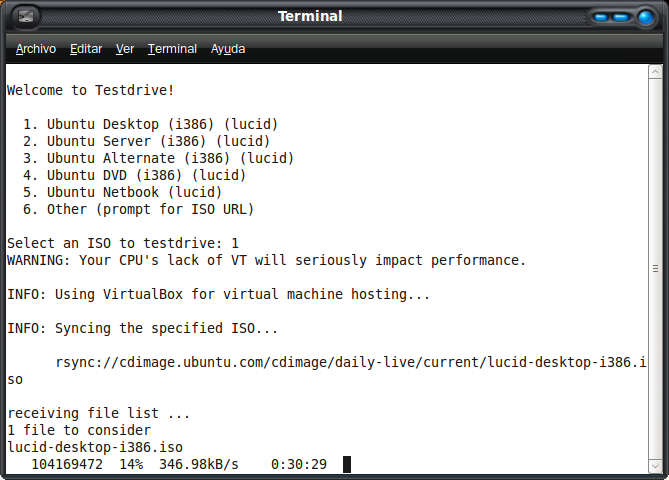
Test Drive makes it simple for you to download and run the latest development version of Ubuntu. By using the rsync command each time you run the latest TestDrive will appear ISO downloaded, so you only download the incremental part of the image.

Nothing that you could not do before, but this makes the automated task.

To use TestDrive, before we need a program that allows us to virtualize the images. I recommend VirtualBox

To install TestDrive in Karmic need to add his PPA repository. Then open a Terminal and:

sudo apt-add-ppa repository: testdrive / ppa

sudo aptitude update

sudo aptitude install testdrive


Once installed, you can run it from Applications> System Tools> TestDrive


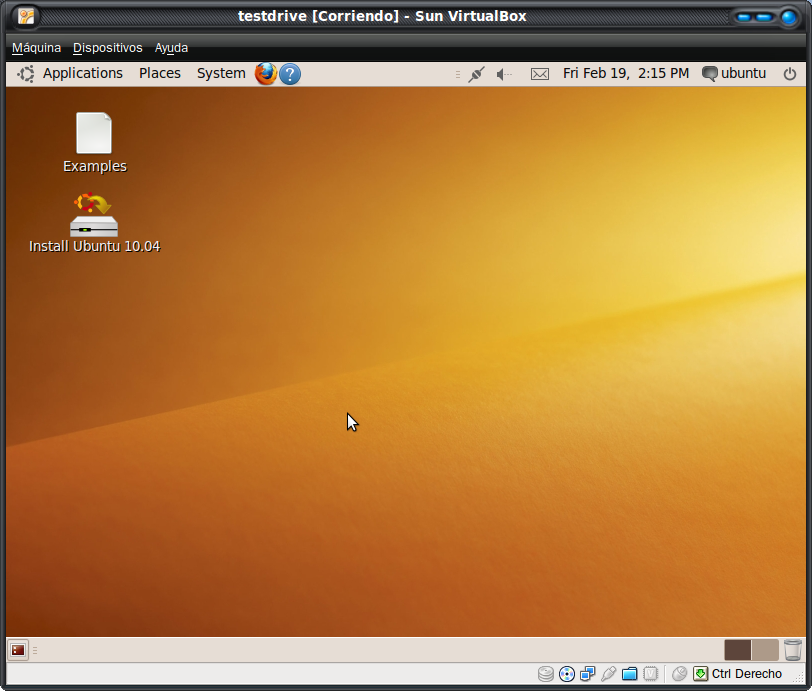
Choose from the list the ISO to try and wait. Test Drive will take care of everything. First download the image, then open the VirtualBox, and we mounted a new virtual disk:


link: http://www.youtube.com/v/rDv7WhPXwVc&color1=0xb1b1b1&color2=0xcfcfcf&hl=en_GB&feature=player_embedded&fs=1


http://www.ubuntips.com.ar/2010/02/19/testdrive-prueba-una-iso-de-ubuntu-en-una-maquina-virtual/

books open source Ubuntu Linux Manuals

books open source Ubuntu Linux Manuals


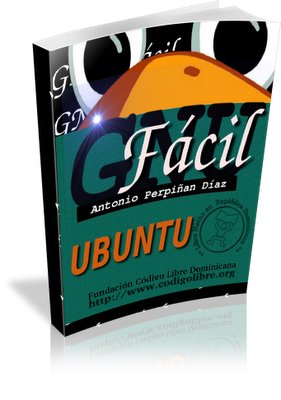
I bring Linux 7 books removed from www.codigolibre.org , all on 1 link.
They are very useful to get into free software and highly recommended.
The books are:

- GNU Easy


- Basic GNU


- Security of GNU / Linux


- Network Administration GNU / Linux


- Administration of GNU / Linux


- Basics of GNU / Linux


- GNU Basically (Second Edition)


link: http://www.gigasize.com/get.php/3199437494/Libros_Linux.rar
I hope they serve Greetings!

Libraries for wine in ubuntu windows

Libraries for wine in ubuntu windows

Ubuntu Linux ubuntu windows


Install wine and winetricks


Wine is basically a program that allows us to use native Windows applications under Linux, and that although normally you can always get an equivalent application in linux always have a program that we resist.

Say it is also a way to use our beloved windows games under linux without having to reboot the pc for it, but for gaming there is another application you'll talk another day.

For those of you living is ubuntu will be very easy to install as it's included in the repositories, so just a matter of marking and implement changes in "synaptic" or "add / remove", if not so you only have to visit the web q and will download the binaries for your distribution here

Once installed we install winetricks wine that is nothing more than an enabler script for adding libraries (dll) to wine.

The installation will be done from a terminal and put the following commands:

$ Wget http://www.kegel.com/wine/winetricks
$ Chmod + x. / Winetricks
$ Sh winetricks


(For those who do not know, do not copy them the $ sign as you pull the wrong terminal, that character is just running as normal user)

Now you should see a window like the following and mark all the dll files that need it, I check all to heal the health and not have to be aware of adding them, and that I leave to your choice.


"This post is not mine, but I found intereseante and add"


demen points thanks

Windows program icons ico icons mu Windows7 win7 Libraries Change

Windows program icons ico icons mu Windows7 win7 Libraries Change


When trying to install libraries in Wine, as DirectX 9, flash, net ,..., usually give errors with this script in shell speed is achieved by the facilities.

just run the following script and select the software.

[/ URL]]
link:
http://hotfile.com/dl/23931019/7bc6897/wine.sh.html

on the console of your distro:

wine.sh sh

Note: It is necessary libraries as g + + g + + -3.3 gcc gcc-3.3 libstdc + +5-3.3-dev for debian and derivatives users, simply install:
sudo apt-get install build-essential


This is my first post.

Directx

Directx


The project Gallium3D of freedesktop.org, so we discolocar by an implementation of the Direct3D API natively on an operating system GNU / Linux, an option that can be extended to other operating systems.

To date, the only way to run software that requires calls to these libraries under GNU / Linux was to go to emulation with Wine, which criminalized the performance, speed and program stability to intercolocar a software layer in the execution (and this having been constructed by reverse engineering process, which can not be known for sure whether they respond correctly in all scenarios).

Thanks to the work done by freedesktop.org, with Gallium3D calls to the API of DirectX will be resolved against a native software, of course, be faster and more stable than the current form of emulated execution.

The main beneficiary of this development will be the games industry, since it will facilitate the adaptation of existing Windows titles that take hold of DirectX to GNU / Linux. Another thing is that the studios want to carry out such an operation, since until now the only penguin platform has represented barely 1% of desktops worldwide, and the dominance of Windows among PC gamers is incontestable .

in ubuntu vlc ... ... .. recommended you have it ...

in ubuntu vlc ... ... .. recommended you have it ...

very good


t hi friends
Remember when you had windows and were using vlc player
and believed it was the best .. for the variety d
video formats.
now that ubuntu linux you use it
Just do this:
in terminal enter this:
sudo apt-get install vlc
or also:
sudo apt-get install vlc

give and go enter already have and enjoy many different formats and
avoid extra headaches restrictivos.este is installing an extra program for ubuntu.


I recommend you use.
comment, and if they can stop points ..
grax you have a wonderful time.

goodbye.

Install packages on Ubuntu / Debian Linux

Install packages on Ubuntu / Debian Linux

Ubuntu Linux install debian packages


Hi, this time I will teach you install packages on Debian-based distributions (Ubuntu / Knoppix, etc).

What are packages?
Packages are programs and libraries compacted (gzip format) with extension "deb" that are already ready to be installed in the system through an installer with these operating systems based on Debian (say Ubuntu).

Where do I get them?
Each distribution has an online repository where packages low platform built for that specific but there are also packages that are not found in these repositories or are outdated and can be downloaded from another site or handmade through a process that will develop here.
These repositories can be changed from the file / etc / apt / sources.list.

As a graphical installer?
It's simple, run synaptic as root, choose / look for the package and give it to install and we will automatically download all the dependencies you need to run this program.
(Clarification): when you first installed Ubuntu no root pass, it can allocate from the console by typing "sudo passwd".

How to install from the console?
Too simple, but requires more practice.
To find a package run the command "apt-cache search description" and we will give a list of packages that match our description. For example, we need an mp3 player: "apt-cache search mp3 player."
Now we need to inspect if it meets our needs, so we run the command "apt-cache show package, for example between the packages listed above was the audacious then:" apt-cache show audacious. "
Ready, audacious really is a very good player and meets our needs, then install it with apt-get install audacious. "

How to install packages downloaded from the internet?
Go to the folder where the package went down from there as root and run "dpkg-i package."
This process can tell us we missing dependencies for the package is installed well, for example if they lower the Virtual Box packages are going to need the Qt4 libraries generally are not installed, then to correct this little problem we run "apt-get -f install ", so no arguments and we will install the libraries we need.

How to uninstall packages?
Easier yet, "apt-get remove package" for example, we realized that audacious was too good for us, we do not deserve it, then run "apt-get remove audacious."

Well, that's all for now folks! (To Bugs Bunny).
I hope you enjoy this mini guide that can save them the trouble at some point. If you have questions, doubts, etc, expresenlas I'll try to answer them.

How to delete old kernels in Linux

How to delete old kernels in Linux

Ubuntu Linux kernel image erase


Good people dipuse me a few days ago to see how clear the kernel not to use on Linux and found this which I found piola share with you.


Every so updates are going to recommend you upgrade kernel. Earlier versions are not removed in case you encounter any problem with the new version. In the grub menu will available versions, and if after a while and we have no problems doing a little disk space could be eliminated.

To remove old kernels we tipeamos console:

dpkg - get-selections | grep linux-image

This command will display the kernles submit that we installed on our machine, in my case I will show:

linux-image-2.6.27-11-generic install
linux-image-2.6.27-7-generic install
linux-image-2.6.27-9-generic install
linux-image-generic install


Then, to eliminate one in particular:

sudo aptitude purge package

Where package is the name of the kernel to delete, such as "linux-image-2.6.27-9-generic"

DO NOT uninstall the linux kernel-image-generic as it is necessary to receive updates of the kernel.

Source

I hope this will be useful Salu2

software manuals to learn open source Ubuntu Linux

software manuals to learn open source Ubuntu Linux


I bring Linux 7 books removed from www.codigolibre.org , all on 1 link.
They are very useful to get into free software and highly recommended.
The books are:

- GNU Easy

link: http://www.gigasize.com/get.php/3199446439/gnu-facil.pdf


- GNU Basic (RECOMENDADO!!)

link: http://www.gigasize.com/get.php/3199446437/GNU-Basico.pdf


- Security of GNU / Linux

link: http://www.gigasize.com/get.php/3199446441/Seguridad-GNU-Final.pdf


- Network Administration GNU / Linux

link: http://www.gigasize.com/get.php/3199446440/networking.pdf


- Administration of GNU / Linux

link: http://www.gigasize.com/get.php/3199446435/Administracion-GNU-Final.pdf


- Basics of GNU / Linux

link: http://www.gigasize.com/get.php/3199446436/Fundamentos-Final-X.pdf


- GNU Basically (Second Edition)

link: http://www.gigasize.com/get.php/3199446438/GNU-Ejercicios-FINAL.pdf


I hope you learn! Greetings

Alpha 3 Released:

Alpha 3 Released:

Ubuntu Rhythmbox


Ubuntu 10.10 release Alpha 3: new


Note: The source is my blog. The base link where I post is within the

Today released the third alpha version of Ubuntu operating system. You can download it from here .

New for this version are:

(Images and info via OMGUbuntu )

Software Center


With the new look and new section with news. Also allows us to share an app via Twitter to all our supporters.


In history, we can review and remove all our installations, updates and uninstalls.

New applet for sound


This lets you control whether the sound of music and the OS. Runs alongside the Rhythmbox music player and supports playlists. I like to display album artwork.

Shared songs from Rhythmbox


Allows us to share our favorite songs by the Ubuntu link One, we can share on Twitter.


Shotwell new image manager


We already more F-Spot. Shotwell is more similar to Picasa. Best in my opinion.

New message menu


New menu integrated with the mailer.


Follow me on Twitter, read the stuff you care about in my blog, and find out before subscribing to the feed